mufatechSTUDIO Try Store Diagnosis

MUFATECH CLEARANCE / SHOPIFY APP

Coming to the Shopify App Store

Clear dead stock. Keep your margin.

Mufatech Clearance shows how long your stock has gone without a sale, marks it down as it ages, never under the margin floor you set, and puts back only the prices it changed when you stop.

Clearance is not listed yet, so it cannot be installed. Store Diagnosis, our free app, is live on the Shopify App Store now and shows the stock that is not selling and the money held in it.

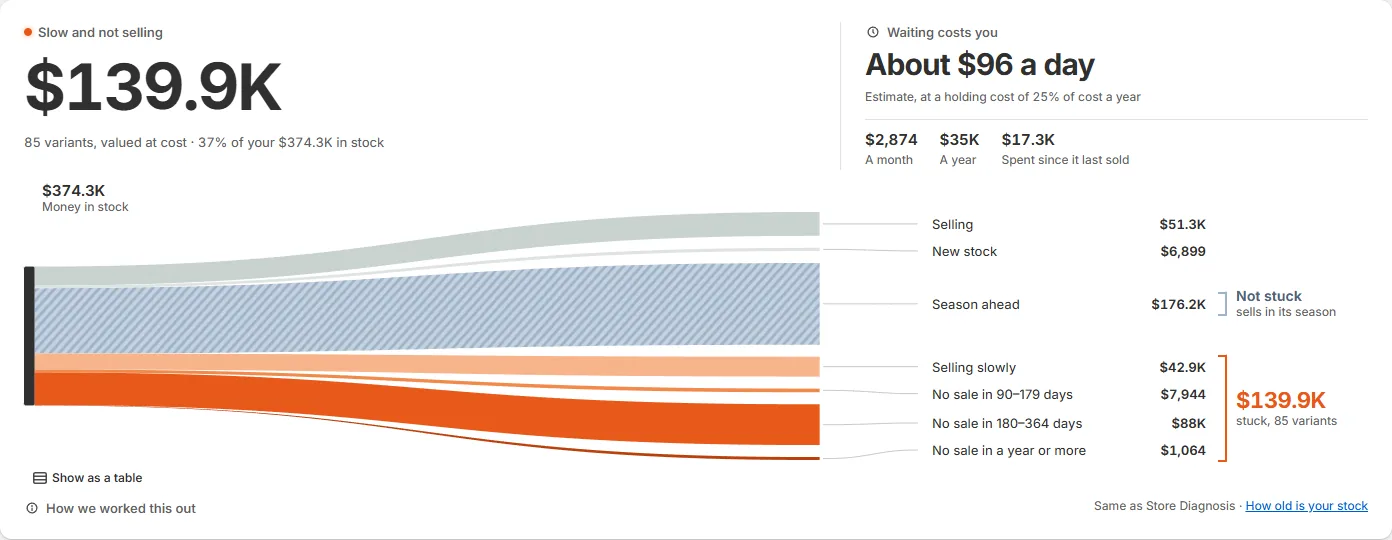
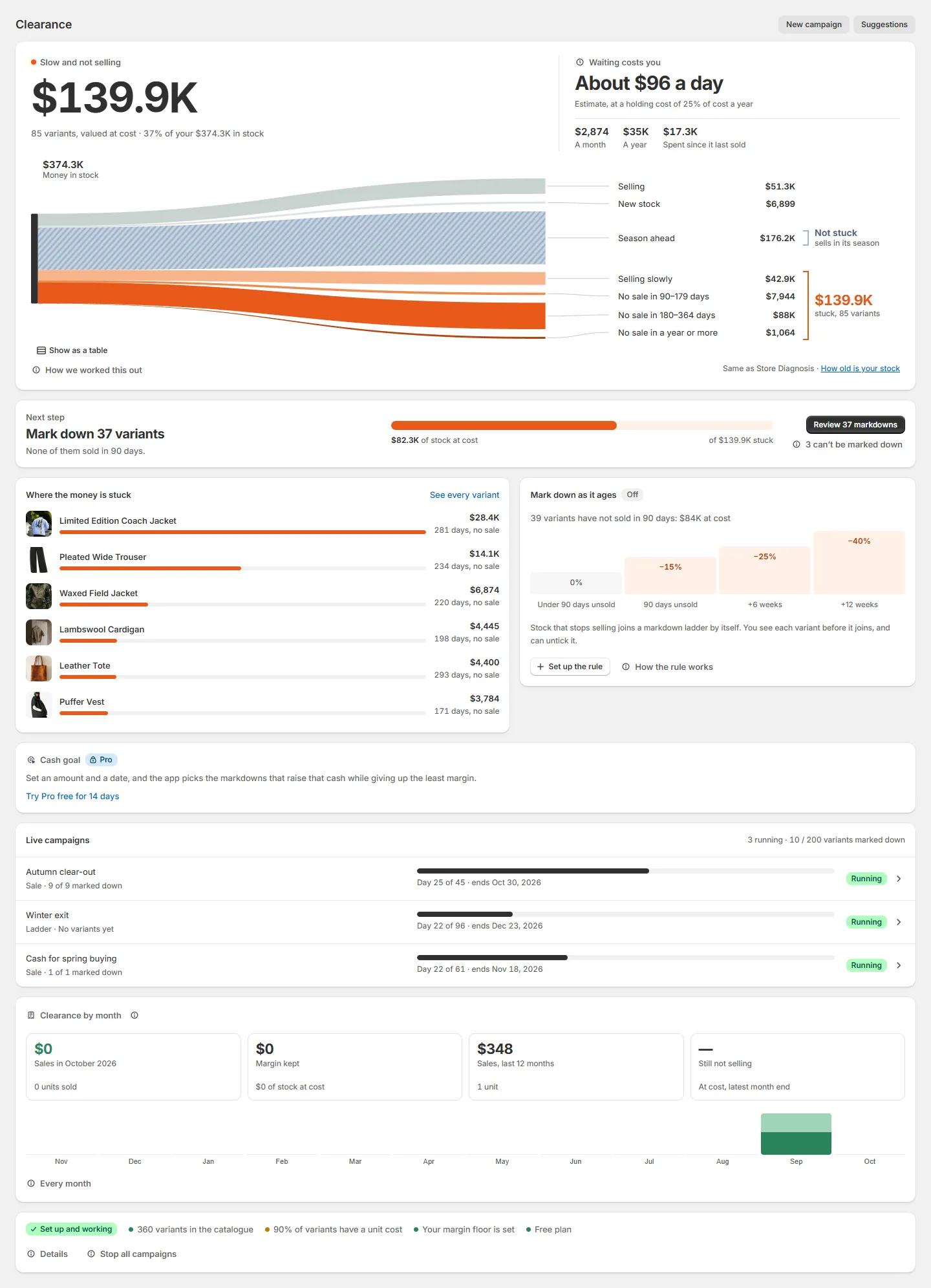
The app’s home: $139.9K of slow and unsold stock, valued at cost, what waiting costs a day, and the money in stock split by days without a sale.
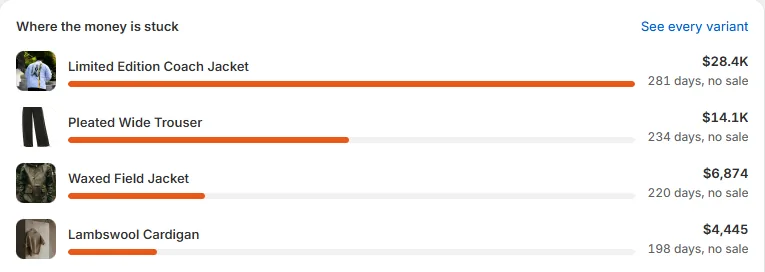
Where the money is stuck: each product with its value at cost and how many days it has gone without a sale.
The app’s home, on a sample store.
Preview first No price changes before you confirm
Your floor No markdown goes under it
Exact undo Only the prices the app changed
Free plan 3 campaigns, 200 variants

HOW IT WORKS

See what is stuck.
Mark it down safely.
Undo anything.

Most apps start with the discount. Clearance starts with how long each item has gone without a sale and why, because a markdown is not always the answer, and it always keeps a way back.

  1. Find it

    See where the money is stuck

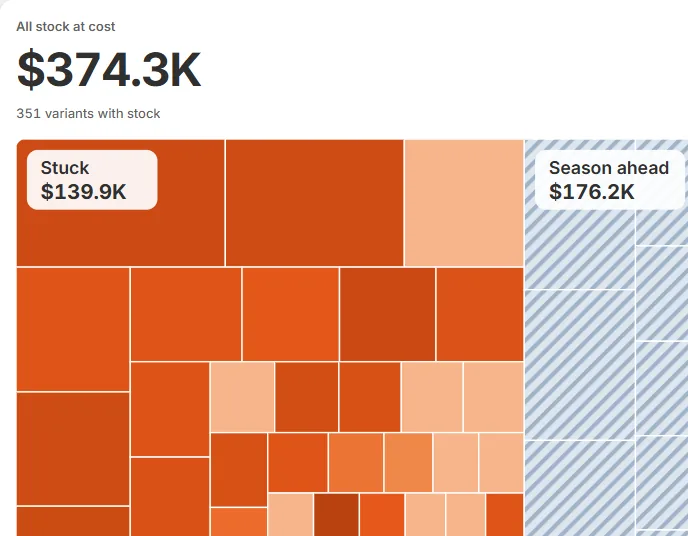
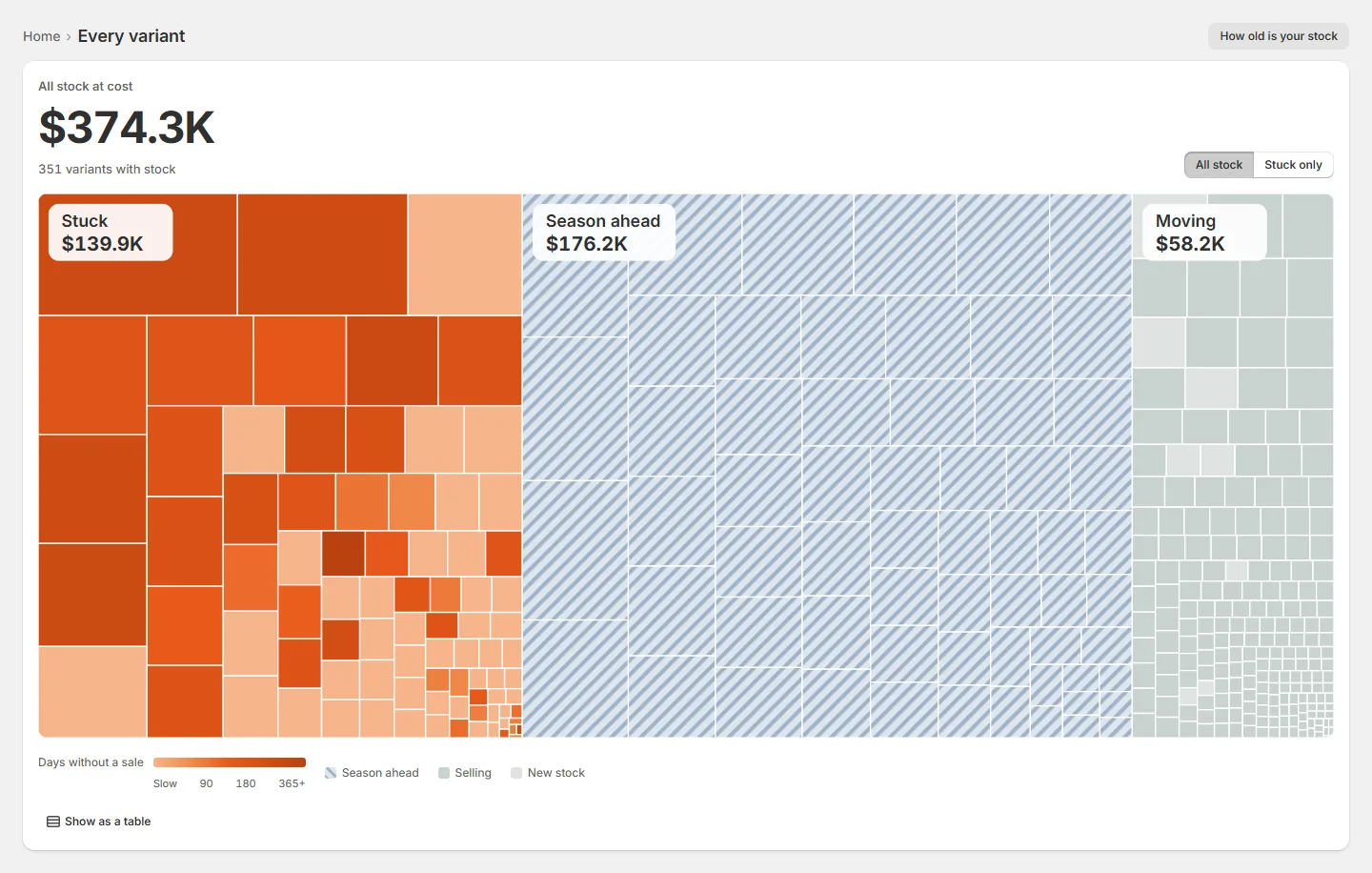
    Every variant on one map, sized by the money in it at cost and coloured by days without a sale. Stock waiting for its season is set apart, so it is never counted as stuck.

    The variant map: all stock at cost, with the stuck variants in orange and the stock waiting for its season set apart.
  2. Mark it down

    Mark down, never under your floor

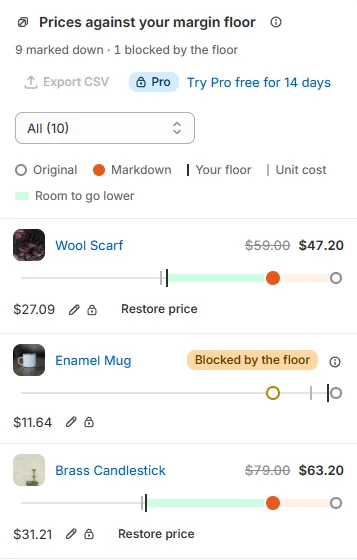
    You see every new price before it goes live. Each markdown is checked against your margin floor: a variant that would go under it is blocked and keeps its price, and every other row has Restore price.

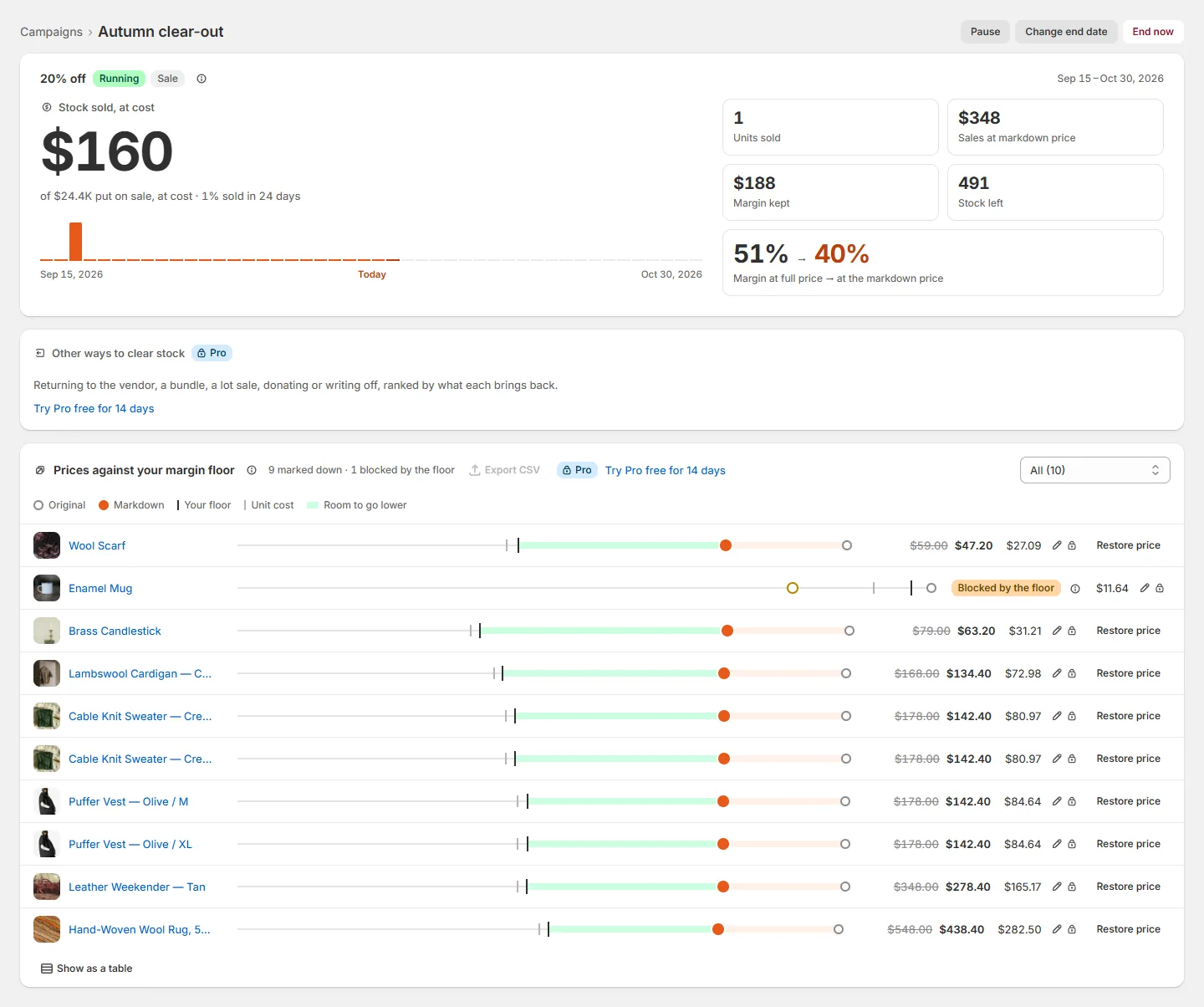
    Prices against the margin floor, on a phone: 9 marked down and 1 blocked by the floor, with a key for the original price, the markdown, your floor and the unit cost, then two variants marked down above their floor with Restore price and one blocked by the floor.
  3. Follow and undo

    See what it sold, then put prices back

    Each campaign shows what it sold, the margin kept and the stock left. Ending it puts back every price the app changed; a price someone else changed since stays as it is.

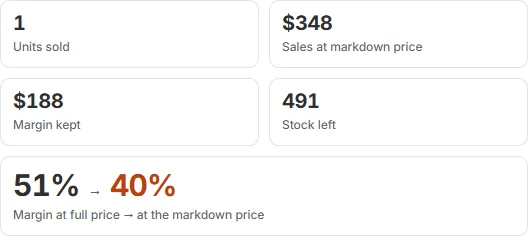
    A campaign’s results: units sold, sales at the markdown price, margin kept, stock left, and the margin at full price and at the markdown price.

Screens from the app, on a sample store. The app shows the same things with your own products and numbers.

THE MARGIN FLOOR

One line no markdown can cross.

You set the lowest price the app may ever set for a variant. It is worked out from what the item really costs you, not from a percentage you hope is safe. Try it: drag the markdown deeper and watch where it stops.

Floor = unit cost × (1 + minimum margin) + payment fee + shipping you pay + expected returns One floor for the store on every plan; Pro adds floors per collection, product and variant. A variant with no unit cost in Shopify is left out until you add one: the app never guesses a cost before it changes a price.
Linen overshirt, MPrice $80.00 · unit cost $34.00 · 10% minimum margin
New price$59.99
You keep a unit$23.95
Margin40%

Above your floor of $38.83. This price can go live.

BEYOND A DISCOUNT

More ways to clear stock
than a discount.

Stuck stock is money you already spent. These tools get it back in the way that costs you the least, and some of them never touch the price at all.

Free: one rulePro: any number

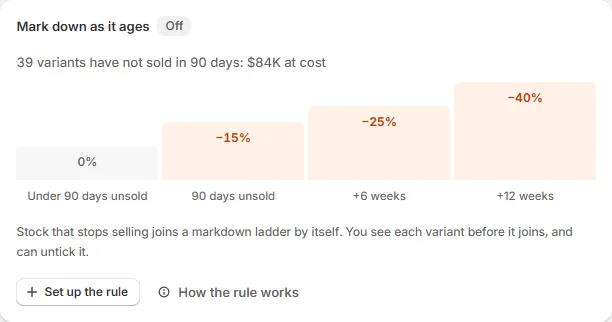
Mark down as it ages

An always-on rule for stock that stops selling. After 90 or 180 days without a sale, as you choose, a variant joins a markdown ladder that suits your trade, such as 15% off, then 25%, then 40%, six weeks apart. You get a notice listing each variant before its first markdown, and you can untick any of them.

The Mark down as it ages card: 39 variants have not sold in 90 days, $84K at cost, and the ladder from no markdown under 90 days unsold to 15%, 25% and 40% off.
Free

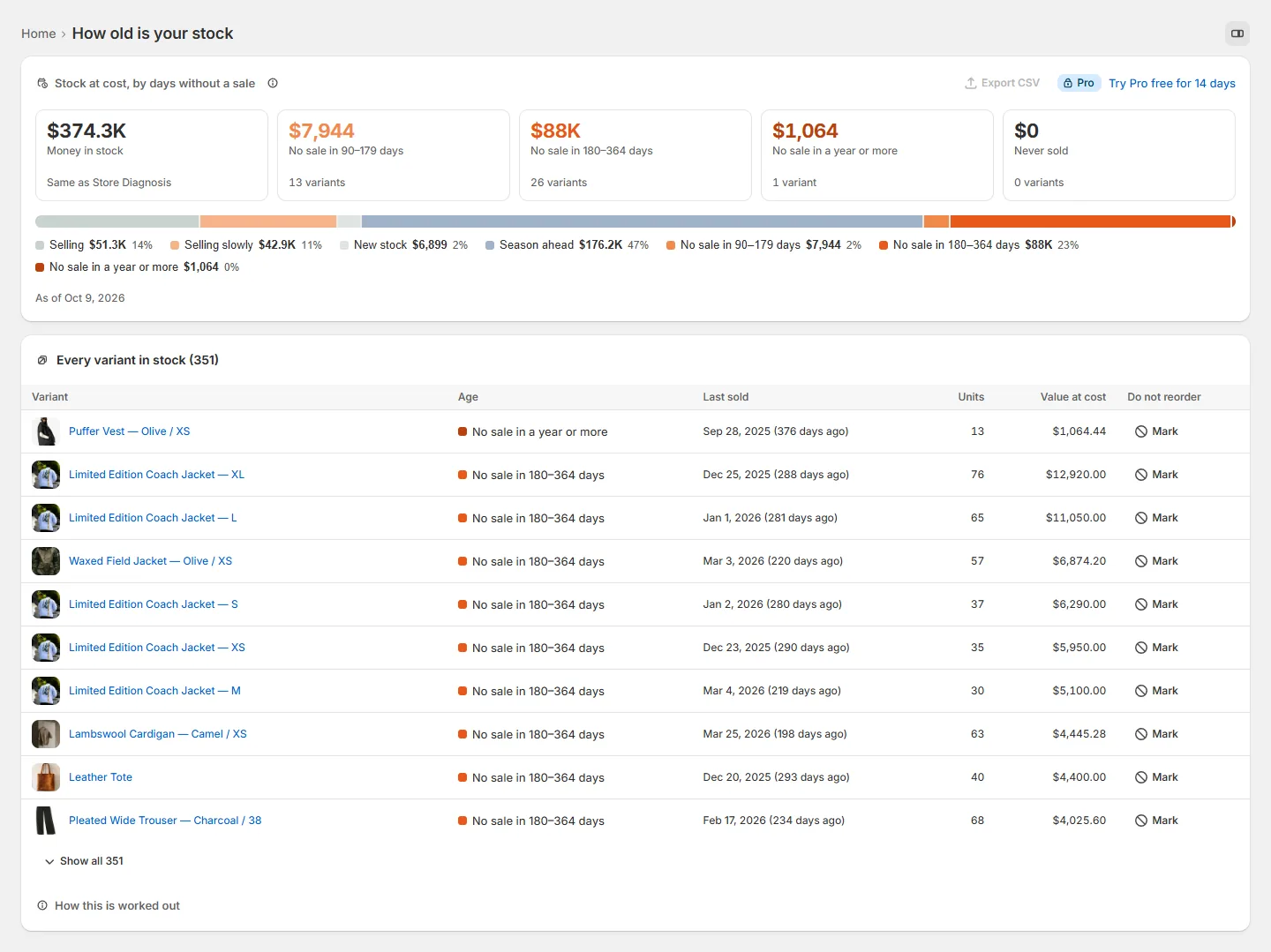
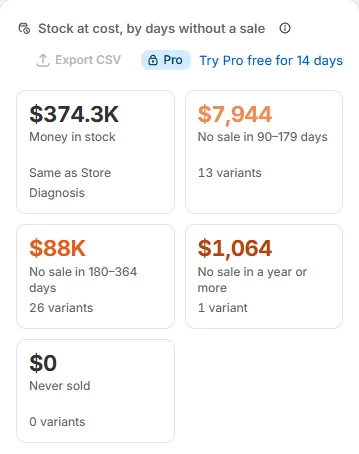
How old is your stock

The money in your stock by days without a sale, adding up to the same money in stock as Store Diagnosis. Mark a whole group down, or mark a variant Do not reorder.

Stock at cost by days without a sale, on a phone: $374.3K money in stock, the same as Store Diagnosis, $7,944 with no sale in 90 to 179 days, $88K in 180 to 364 days, $1,064 in a year or more and $0 never sold.
Free to seePro plans

Why it is stuck

Each stuck variant gets one reason: not selling, selling slowly, season ahead, broken sizes, back from returns or not being seen. New stock is left alone. Pro adds a plan for each reason.

Free

What waiting costs you

An estimate of what stuck stock costs you each day you hold it, at a holding cost you can change in Settings, and the point where a markdown now costs less than waiting.

Pro

Cash goal

Say how much cash you want to raise and by when. The app picks the markdowns that reach it for the least margin, and shows how likely the goal is as a range, not a promise.

Pro

Put seasonal stock away

Instead of marking it down, seasonal stock comes off the online store at the end of its season and goes back on before its strong months, at full price. You see the dates and can undo them.

Pro

A gift from stuck stock

A stuck item becomes a free gift above a cart value the app suggests, while stock lasts and within a daily limit. It is counted at cost, and never takes an order below zero margin.

Pro

Price-drop wish list

A block on slow products lets shoppers say the price they would buy at. Before any markdown you see how many wait at each price. The app keeps counts only, never names or emails.

Pro

EU and UK: the lowest price of the last 30 days

A daily price history from install. The compare-at price and the percentage off are worked out from the lowest price of the 30 days before a markdown, with warnings when a rule is at risk, and a block that shows that price on the product page.

Screens from the app on a sample store; the wish list and the 30-day low are drawn with sample figures. The EU and UK help makes the rules easier to follow; it is not legal advice, and applying them to your store is your decision.

SAFETY, ON EVERY PLAN

Prices are your income.
We treat them that way.

An app that changes prices has to be the one you trust most. These five safeguards are part of every plan, including Free, and are never sold as extras.

  • A preview first

    Old and new prices, compare-at prices, margins and stock for every variant. No price changes until you confirm.

  • Your floor is a hard stop

    No markdown goes under your margin floor, whatever is typed. A variant that would is blocked by the floor and keeps its price.

  • Undo, exactly

    Ending a campaign puts back every price the app changed. A price someone else changed since stays as it is and is listed for you.

  • An alert when someone else changes a price

    If a price in a live campaign is changed outside the app, you choose: use our price again, or keep the other price. Many changes at once pause the campaign.

  • Stop all

    One button ends every campaign and puts back every price the app changed. Use it before you uninstall: after that, Shopify no longer lets any app restore prices.

PLANS

Start free.
Choose with one question.

Every plan scans your whole catalogue and includes every safeguard. Paid plans never count your variants, and are billed by Shopify with your other charges, in US dollars.

Do you sell wholesale, or does your accountant need a record of every price change?

No: Pro has what you need, the EU and UK 30-day low included. Yes: Plus adds B2B catalog prices, the evidence log and the accountant pack.

Free

$0

No trial needed

For every store: see what is stuck and clear it on a small scale.

  • Up to 3 campaigns and 200 variants at once
  • Preview, margin floor and exact undo
  • Markdown suggestions and ladders
  • How old is your stock, and Do not reorder
  • One Mark down as it ages rule
  • Every variant on one map
  • Why each variant is stuck
  • What waiting costs you
  • How much of your sales depend on discounts
  • Scheduled sales with a start and an end date
  • One margin floor for the store
  • Campaign results and sales by month
Recommended

Pro

$3.99 a month

or $36 a year · 14-day free trial

For most stores, including stores selling in the EU or UK.

  • Any number of campaigns and variants: we never count them
  • Any number of Mark down as it ages rules
  • EU and UK 30-day low: price history, compare-at price and warnings
  • Storefront block: lowest price in the last 30 days
  • Floors per collection, product and variant
  • CSV export of every table
  • Cash goal and exit date planner
  • A plan for each reason stock is stuck
  • Put seasonal stock away until its season
  • Gift from stuck stock
  • Price-drop wish list
  • Markdowns for broken size runs
  • Discount code guard and sale limits
  • Simulation before you start
  • Market price lists and Shopify Flow

Plus

$7.99 a month

or $69 a year · 14-day free trial

For stores selling wholesale, or whose accountant needs a record of every price change.

  • Everything in Pro
  • B2B catalog prices and lot sales to B2B buyers
  • Sale badge check for Google and other channels
  • Evidence log and accountant pack, with a month-end stock age sheet
  • Quiet clearance for brands that must not look cheap
  • Priority support
A trial when it helps The 14-day trial is offered when you reach a limit of the Free plan or open a Pro or Plus feature, not the moment you install.
No countdowns The trial end date and the amount Shopify will bill are shown once at the start and once around day 10.
Nothing undone behind your back Move to a smaller plan and a running ladder keeps its steps. Live campaigns run to their end date.

PERMISSIONS AND PRIVACY

Changes prices you approve.
Never reads your customers.

Clearance needs to change prices, so it asks for write access to products. It asks for nothing about who your customers are.

What it asks Shopify for

  • read_products write_productsProducts, variants, prices and cost per item. It changes the prices and compare-at prices you confirm, and market price list prices on Pro and Plus.
  • read_inventory read_locationsStock levels, so it knows what is stuck and when it has cleared.
  • read_ordersOrder lines, discounts and refunds, to know when each variant last sold and what a campaign sold. No customer field is read. Until Shopify approves access to older orders, the app reads the last 60 days and says so.
  • read_marketsWhich markets you sell in, for market prices and the EU and UK rules.
  • read_publications write_publicationsUsed only when you put seasonal stock away: it takes those products off the online store and puts them back.
  • write_discountsUsed only for the gift and the discount code guard: the automatic discount that adds the gift and keeps codes off clearance prices.
  • write_app_proxyLets the price-drop wish list on your product pages send its counts through your store’s own address.
  • write_draft_ordersOptional, on Plus: asked for only if you want the app to draft the invoice for a lot sold to a B2B buyer.

What it never does

  • Reads or stores a customer’s name, email address, postal address or phone number.
  • Stores who signed up to the wish list. It keeps how many shoppers wait at each price, and nothing else.
  • Emails your customers. Price drop messages go through your own email tool, to people who agreed to hear from you.
  • Keeps your store’s data after you leave: it is erased when Shopify asks, 48 hours after uninstall.

Data is held on Mufatech’s own server with Hetzner in Germany, with daily backups on Cloudflare R2. Details in the privacy policy, the terms and the data processing addendum.

Speaks your admin’s language.

The app follows the language your Shopify admin is set to, with amounts in your store’s currency.

QUESTIONS

Before you install.

Something else on your mind? Write to [email protected].

When can I install Mufatech Clearance?

Not yet. It is coming to the Shopify App Store and cannot be installed until it is listed there. To see your dead stock today, install Store Diagnosis, our free app, which is live on the Shopify App Store: it shows the stock that is not selling and the money held in it. Clearance’s stock age adds up to the same money in stock.

Can a markdown go below my cost?

Not below your margin floor: the unit cost plus your minimum margin, the payment fee, the shipping you pay and the expected cost of returns. A price under the floor never goes live, whatever is typed; you can lower the floor yourself in Settings. A variant with no unit cost in Shopify is left out until you add one, because the app does not guess a cost before it changes a price.

How does it know how old my stock is?

From the day each variant last sold, read from your orders. Your stock is grouped by days without a sale (new stock, season ahead, no sale in 90 to 179 days, 180 to 364 days, a year or more, and never sold) and valued at cost. The groups add up to the same money in stock as Store Diagnosis. Until Shopify approves the app’s access to older orders, it reads the last 60 days of orders and says so on the page.

What does Mark down as it ages do?

It is a rule that runs on its own. You choose when stock joins (no sale in 90 or 180 days) and a ladder that suits your trade, for example 15% off, then 25%, then 40%, six weeks apart. Before the first markdown you get a notice listing every variant that would join, and you can untick any of them. The Free plan has one rule; Pro and Plus have any number.

What happens if I uninstall the app?

Shopify removes an app’s access the moment it is uninstalled, so no app can put prices back after that. Prices the app changed stay as they are. Before you uninstall, press Stop all campaigns on the home page: it ends every campaign and puts back the prices the app changed. 48 hours after you uninstall, Shopify asks us to erase your store’s data, and everything Clearance holds about your store is deleted then.

What if someone on my team changes a price during a campaign?

The app notices it and asks what you want: use our price again, or keep the other price. If many prices change at once, the campaign pauses and tells you. When the campaign ends, a price someone else changed stays as it is and is listed, never overwritten.

How is this different from a bulk price editor?

A bulk editor changes the prices you pick. Clearance starts from how long each item has gone without a sale and why it is stuck, and suggests what to do about it, which is not always a markdown. It checks every new price against your floor, shows a preview before any price changes, and keeps a record of every price it changes so it can put back exactly what it changed.

Does the app email my customers?

No. The price-drop wish list keeps only how many shoppers wait at each price, never who they are. When a markdown reaches a wished price, a Shopify Flow trigger lets your own email tool write to the shoppers who agreed to hear from you.

Will it make my sales follow EU and UK price rules?

On Pro and Plus it helps you follow them. It keeps a daily price history, uses the lowest price of the 30 days before a markdown as the price the discount is measured from, warns about a price raised shortly before a markdown or a sale that runs too long, and can show the lowest price of the last 30 days on the product page in EU markets. Applying the rules to your store is still your decision, and the app is not legal advice.

Which plan do I need?

Answer one question: do you sell wholesale, or does your accountant need a record of every price change? If not, Pro has what you need, the EU and UK 30-day low included. If you do, Plus adds B2B catalog prices, the evidence log and the accountant pack. Free lets you run up to 3 campaigns and 200 variants at once first, with markdown suggestions and ladders, one Mark down as it ages rule and every safety feature. Paid plans never count your variants.

How does the free trial work?

Pro and Plus have a 14-day free trial. It is offered when you reach a limit of the Free plan or open a Pro or Plus feature, not at install. The trial end date and the amount Shopify will bill are shown once when it starts and once around day 10, with no countdowns. Shopify bills the plan with your other charges, and you can change or cancel it on Shopify’s plan page.

What happens if I move to a smaller plan?

Nothing is undone behind your back. Markdown ladders are part of every plan, so a running ladder keeps its steps, and campaigns over the new limit stay live until their end date but cannot be extended.

Which languages is it in?

Fourteen: English, German, French, Spanish, Italian, Dutch, Portuguese (Brazil), Japanese, Chinese (Simplified), Chinese (Traditional), Korean, Swedish, Danish and Polish. The app follows the language your Shopify admin is set to.

Where is my data stored?

On Mufatech’s own server with Hetzner in Germany, with daily backups on Cloudflare R2. The daily price history is kept for up to 400 days while the app is installed, so the 30-day low always has the days it needs.

MUFATECH CLEARANCE · STATUS

Coming to the Shopify App Store.

Clearance is not listed yet, so it cannot be installed. You can see your dead stock today with Store Diagnosis, our free app on the Shopify App Store: it finds the stock that is not selling and the money held in it.

Store Diagnosis only reads your store. It never changes a price.

  • Status Coming to the Shopify App Store
  • Plans Free · Pro · Plus
  • Safety Preview · floor · exact undo
  • Access Prices you confirm · no customer data
  • Languages 14 · follows your admin